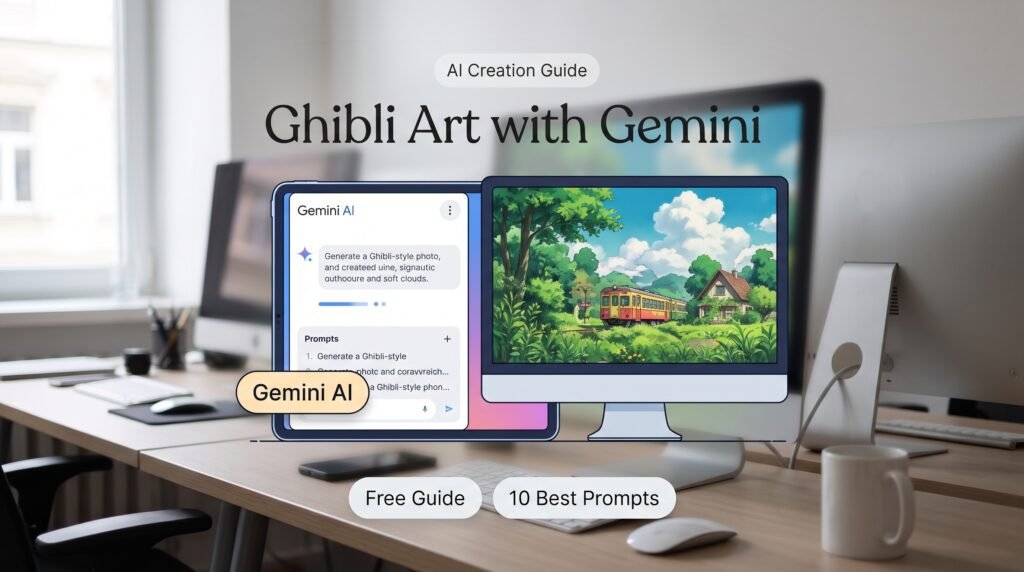
Want to know how to make a Ghibli photo from your own picture? “How to make Ghibli photo” was one of Pakistan’s top “how to” searches of 2025, and the trend is still going strong on Instagram, Facebook and WhatsApp statuses. Aap apni ek normal selfie ko kuch hi seconds mein khoobsurat cartoon style mein badal sakte hain. In this guide you will learn how to do it free with Google Gemini, which prompts give the best results, and how businesses can use the same skill for marketing.
What is a Ghibli-style photo?
Studio Ghibli is a famous Japanese animation studio, known for films such as Spirited Away and My Neighbor Totoro. Its look is soft and hand-painted: warm colours, big expressive eyes, fluffy clouds and dreamy backgrounds. A “Ghibli-style photo” is an AI image that redraws your photo in a similar soft anime look.
The trend went viral in 2025 when new AI image tools made it possible for anyone to do this on a phone. Gemini’s image model, nicknamed Nano Banana, launched in August 2025 and became popular for editing people’s own photos while keeping their face recognisable.
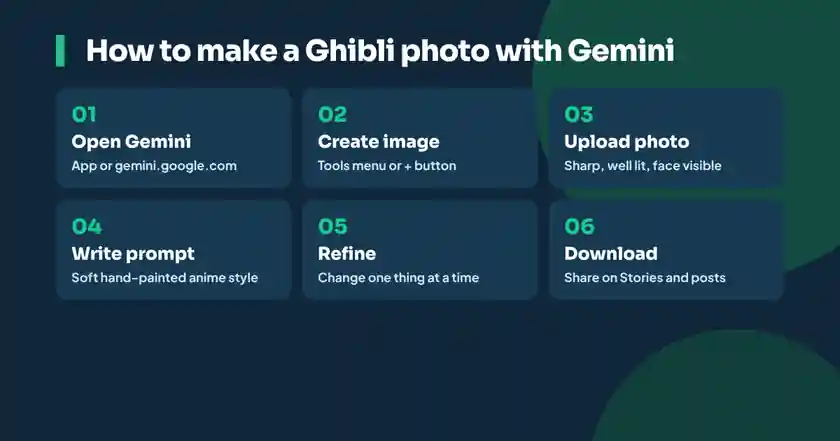
How to make a Ghibli photo with Gemini: step by step
- Open the Gemini app or go to gemini.google.com and sign in with your Google account.
- Tap the tools or plus menu and choose Create image, or simply attach a photo with the plus button.
- Upload a clear photo: good light, face visible, not too far away. One or two people works best.
- Type a prompt such as: “Redraw this photo in a soft, hand-painted Japanese anime film style, warm colours, dreamy sky, keep the same faces and clothes.”
- Wait a few seconds. If you do not like the result, ask for changes: “make the background a green village”, “add evening sunset light”, “keep my glasses”.
- Download the image and share it. Free accounts have a daily image limit, so try your best prompt first.
You can do the same in ChatGPT: upload your photo, write a similar prompt, and it will create an image. Results differ a little between tools, so try both and keep the one you like.
10 prompts that give beautiful results
| Style | Prompt (copy and change) |
|---|---|
| Classic Ghibli look | Redraw this photo in a soft hand-painted anime film style, pastel colours, fluffy clouds, keep the same faces |
| Family portrait | Turn this family photo into a warm anime illustration in a garden, evening light, everyone smiling |
| Village scene | Place me in a peaceful green village with a small river, soft anime painting style |
| Rainy day | Make this photo a rainy anime scene with a red umbrella and glowing street lights |
| Eid special | Turn this photo into a festive anime illustration with Eid lanterns, moon and warm lights |
| Wedding | Redraw this wedding photo as a dreamy anime painting, keep the dress colours |
| 3D figurine | Make a realistic 3D collectible figurine of the person in this photo, standing on a desk with its box behind it |
| Saree or traditional dress | Create a vintage-style portrait of this person in a flowing traditional outfit, golden hour light, film grain |
| Kids storybook | Turn this photo of my child into a cute storybook illustration with soft colours |
| Shop or product | Redraw this shop front as a cosy anime street scene with warm evening lights and the shop name visible |
Tips for a better Ghibli photo
- Use a sharp photo: blurry or dark photos give strange faces.
- Say what to keep: “keep the same face, hijab and clothes” helps the AI stay close to you.
- Describe the mood: words like “warm”, “peaceful”, “golden hour” and “nostalgic” change the feel.
- Fix one thing at a time: ask for small edits in follow-up messages instead of rewriting the whole prompt.
- Square or vertical: ask for a 9:16 image for Stories and Reels, or a square for posts.
Is it safe? Privacy and copyright
These trends are fun, but think before you upload.
- Your photos: anything you upload is processed by the AI company. Avoid photos with your CNIC, house number, car number plate or school uniform logo.
- Other people’s photos: ask for permission before you upload a friend’s or relative’s photo, especially women and children.
- Watermarks: Google adds an invisible SynthID watermark to images made with its AI so they can be identified as AI-generated. Do not present an AI image as a real photograph.
- Copyright and style: the Ghibli look belongs to a real studio and its artists, and some artists dislike AI copies of their style. Personal fun is common, but do not sell prints or merchandise as “Studio Ghibli” or use their characters and logo.
How businesses can use AI photo editing
The same tools that make Ghibli selfies can save small businesses a lot of money. A clothing seller in Hyderabad can put one product on different backgrounds, a bakery can create a festive banner in minutes, and a tutor can design a friendly poster for a new batch.
- Product photos on clean or seasonal backgrounds.
- Eid, Ramzan, 14 August and wedding season creatives.
- Story and Reel covers in one consistent style.
- Illustrated characters for a brand mascot.
- Mock-ups of a shop board or packaging before you print.
Tip: always check text, logos and prices in AI images. AI tools often spell words wrong, so add text later in Canva if it must be exact.
Can you earn money with AI images?
Yes, if you use AI as one tool inside a real skill. Freelancers in Pakistan offer social media creatives, product photo editing, thumbnail design and AI-assisted content packages to local shops and international clients. Clients pay for good taste, fast delivery and understanding their brand, not just for pressing a button. Read our guide to start freelancing in Pakistan to see how to turn this into income.
Learn AI content creation in Urdu
If you enjoyed making your first Ghibli photo, you already have the curiosity that content creators need. Afhaam Academy’s AI content creation course teaches AI images, video, captions and Canva design live in easy Urdu, with real projects for your portfolio. Not sure which AI to use? Compare them in Gemini vs ChatGPT vs DeepSeek, or learn writing prompts in our ChatGPT in Urdu guide.
Learn AI content creation in Urdu
How to make a Ghibli photo: common questions
How can I make a Ghibli photo for free?
Open Gemini or ChatGPT, upload a clear photo and ask it to redraw the photo in a soft, hand-painted Japanese anime film style. Both have free daily limits.
Which app is best for Ghibli-style photos?
Google Gemini and ChatGPT both make good Ghibli-style images from your own photo. Try the same prompt in both and keep the result you like.
Is making Ghibli photos safe?
It is generally safe for personal fun, but avoid uploading photos that show private details, and ask permission before using other people’s photos.
Can I use Ghibli-style images for my business?
You can use your own AI-styled images in marketing, but do not use Studio Ghibli’s name, logo or characters, and do not sell them as official artwork.
Why does the AI change my face?
Blurry photos and short prompts cause it. Use a sharp photo and add “keep the same face and clothes” to your prompt.
What is Nano Banana?
Nano Banana is the nickname of Google Gemini’s image model, launched in August 2025. It is known for editing your own photos while keeping faces recognisable.