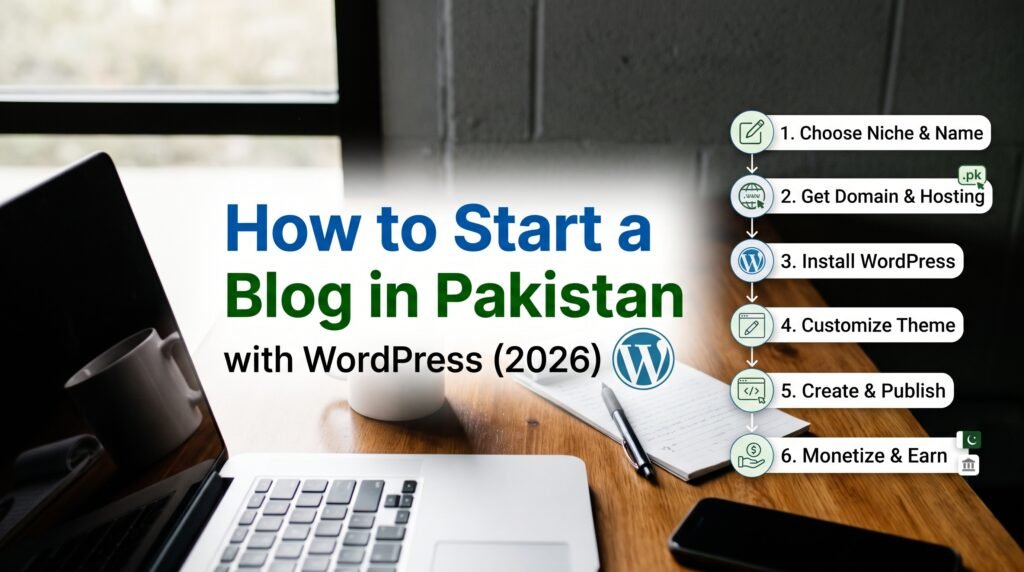
Want to know how to start a blog in Pakistan? You need four things: a topic, a domain name, web hosting and WordPress. With these, you can have a professional blog live in one afternoon for a few thousand rupees a year. “How to upload blog” was one of Pakistan’s top how-to searches of 2025, so this guide also shows exactly how to upload and publish your first blog post, step by step. Agar aap ko likhna pasand hai ya koi skill share karni hai, blog aap ki online pehchan ban sakta hai.
Why start a blog in Pakistan in 2026?
- Your own space: social media accounts can be blocked or lose reach overnight. Your blog belongs to you.
- Google traffic for years: one helpful post can bring readers from Google for a long time.
- Earning options: ads, affiliate links, your own services or courses, and sponsored posts.
- A portfolio: a blog proves your writing, SEO or subject knowledge to clients and employers.
How to start a blog in Pakistan: 8 easy steps
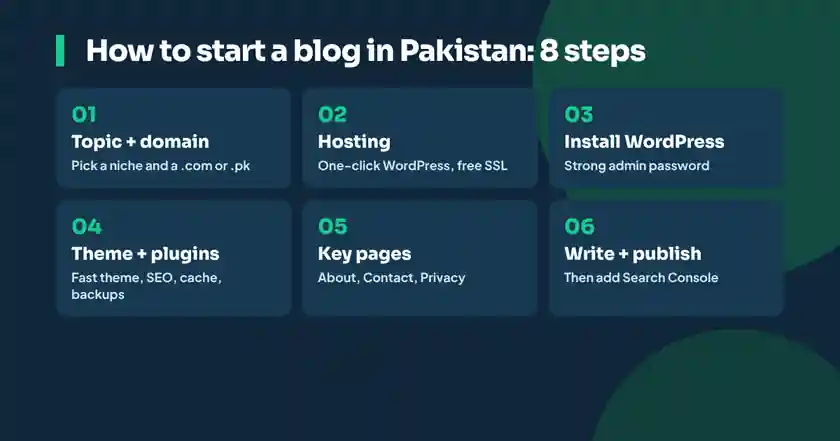
Step 1: Choose your blog topic (niche)
The first step in how to start a blog in Pakistan is choosing a topic. Pick something you know and can write 50 posts about. Good niches in Pakistan include recipes, education and exam tips, tech and mobile reviews, travel in Pakistan, personal finance, health, Islamic topics, and skills like freelancing or digital marketing. A focused niche ranks faster on Google than a blog about everything.
Step 2: Pick a domain name
Your domain is your blog’s address, like yourname.com. Keep it short, easy to spell and related to your topic. A .com works everywhere; a .pk or .com.pk domain, managed by PKNIC, shows you are a Pakistani site. Many hosting companies sell domains, often free for the first year with hosting.
Step 3: Buy web hosting
Hosting is the computer that keeps your blog online. For a new blog, shared WordPress hosting is enough. Look for one-click WordPress install, free SSL (the padlock in the browser), daily backups, and support you can reach when something goes wrong. Pay with a debit card, or with a local payment option if the company offers it.
Step 4: Install WordPress
WordPress is free software from WordPress.org and it powers a large share of all websites in the world. Most hosts have a one-click installer. Choose your site name, an admin username (not “admin”) and a strong password. When it finishes, you can log in at yourdomain.com/wp-admin.
Step 5: Choose a fast, simple theme
A theme controls how your blog looks. Choose a lightweight, mobile-friendly theme such as Astra, GeneratePress or Kadence. Most readers in Pakistan visit on phones, so check how it looks on mobile first.
Step 6: Install a few essential plugins
| Plugin type | Why you need it | Examples |
|---|---|---|
| SEO | Titles, descriptions, sitemaps | Rank Math, Yoast SEO |
| Speed and cache | Faster loading pages | LiteSpeed Cache, WP Super Cache |
| Security | Blocks attacks and bad logins | Wordfence, your host’s security tools |
| Backups | Restore your site if something breaks | UpdraftPlus, host backups |
| Forms | Contact form for readers | WPForms, Contact Form 7 |
Keep plugins few and up to date. Every extra plugin can slow your site or add a security risk, and outdated plugins are one of the most common ways WordPress sites get hacked.
Step 7: Create your key pages
- About: who you are and why readers should trust you.
- Contact: a form or email address.
- Privacy Policy: required for ads and good practice.
- Start Here or Blog: where new readers begin.
Step 8: Connect Google Search Console
Add your blog to Google Search Console and submit your sitemap (for example yourdomain.com/sitemap_index.xml with Rank Math). It tells Google your blog exists and shows which searches bring you visitors.
How to upload a blog post in WordPress: step by step
- Log in at yourdomain.com/wp-admin.
- Go to Posts, then Add New Post.
- Type your title at the top. Put your main keyword near the beginning, for example “How to Make Biryani at Home: Easy Recipe”.
- Write in blocks. Press Enter for a new paragraph, type / to add a heading, list, image, table or video.
- Add headings (H2 and H3) to break the post into sections. Readers skim, and Google reads headings to understand the topic.
- Add images with the Image block. Compress them first (WebP is best) and write a short alt text that describes the image.
- In the right sidebar, choose a Category, add a few Tags and set a Featured image.
- Fill the SEO box from your SEO plugin: SEO title, meta description and focus keyword.
- Edit the URL slug to something short, like /biryani-recipe/.
- Click Preview to check it on mobile, then Publish.
That is it: your blog post is live. Share it on your social media and WhatsApp groups so the first readers arrive while Google discovers it.
How to write a blog post people (and Google) love
- Answer one question per post. Search the question on Google first and see what the top results cover.
- Answer early. Give the short answer in the first paragraph, then explain.
- Add your own experience. Photos you took, mistakes you made, local prices and examples. This is what AI-written copies cannot fake.
- Use simple language. Short sentences, short paragraphs, lists and tables.
- Link to related posts. Internal links help readers stay longer and help Google understand your site.
- Update old posts. Refresh prices, dates and steps every few months.
These are basic SEO habits. Learn more in our beginner guide to what SEO is and how it works, or follow our roadmap to become an SEO expert. To make your posts ready for AI search, read what Google AI Mode in Urdu means for bloggers.
How to earn after you start a blog in Pakistan
| Method | How it works | When to start |
|---|---|---|
| Google AdSense | Ads show on your blog and you earn per view or click | After 20 to 30 quality posts and steady traffic |
| Affiliate marketing | Commission for products bought through your link | Once you review or recommend products |
| Your own services | Writing, SEO, design or tutoring clients find you via the blog | From day one |
| Sponsored posts | Brands pay you to write about them | Once you have a focused audience |
| Digital products | E-books, templates, courses | Once readers trust you |
For AdSense, read the Google AdSense eligibility rules first. Approval depends on original, helpful content, clear navigation and following Google’s policies. Copied or thin posts are the most common reason for rejection.
How to start a blog in Pakistan for free: Blogger or WordPress.com
If you want to start a blog in Pakistan without spending anything, Blogger (by Google) and WordPress.com both offer free blogs on a subdomain such as yourname.blogspot.com. They are good for practice, but a self-hosted WordPress blog on your own domain gives you full control, more design freedom and a more professional look.
Learn how to start a blog in Pakistan with live classes
Afhaam Academy’s AI website development course teaches WordPress from scratch, live in easy Urdu: domain, hosting, design, SEO basics and using AI to speed up writing and design. Prefer to grow traffic? Our SEO course in Urdu is the next step. Use AI to plan posts with our ChatGPT in Urdu guide.
Learn WordPress and blogging in Urdu
How to start a blog in Pakistan: common questions
How much does it cost to start a blog in Pakistan?
A self-hosted WordPress blog usually costs a few thousand rupees a year for a domain and shared hosting. Free options such as Blogger cost nothing but have fewer features.
How do I upload a blog post in WordPress?
Go to Posts, then Add New Post, write your title and content, add images with alt text, choose a category and featured image, fill the SEO box, and click Publish.
Can I earn money from blogging in Pakistan?
Yes, through Google AdSense, affiliate marketing, your own services, sponsored posts and digital products. It usually takes several months of regular posting.
Which is better, Blogger or WordPress?
Blogger is free and simple for practice. WordPress on your own domain gives more control, better design and a more professional image.
How many posts do I need for AdSense approval?
Google does not set a fixed number. Many bloggers apply after 20 to 30 original, helpful posts with clear About, Contact and Privacy pages.
Can I write my blog in Urdu?
Yes. WordPress supports Urdu, and Urdu content has less competition on Google for many topics.