
So you have picked a keyword and written the page. Before you hit Publish, spend fifteen minutes on the part most beginners skip: on-page SEO. This on-page SEO checklist has 20 simple checks you can run on any blog post, service page or course page. None of them need coding, and if your site runs on WordPress you can do every one yourself.
In one paragraph: on-page SEO means optimising everything on the page itself: the keyword and intent, title tag, URL, meta description, headings, content, images, internal and external links, structured data, mobile experience and speed. Use the checklist below for every page you publish.
What is on-page SEO?
On-page SEO is everything you change on your own page to help it rank higher and earn more clicks. It sits next to two other parts of SEO: technical SEO (making the whole website easy to crawl and fast) and off-page SEO (earning trust from other websites, like backlinks and reviews). For the off-page side, our free backlink sites list is the easiest place to begin. You can learn how the three fit together in our complete beginner’s guide to SEO.
It is also the part you fully control. You cannot force another website to link to you, but you can fix your own title tonight. That is why it is the best place to start, and why a well-made page on a small site can still beat a big website that answers the question badly.
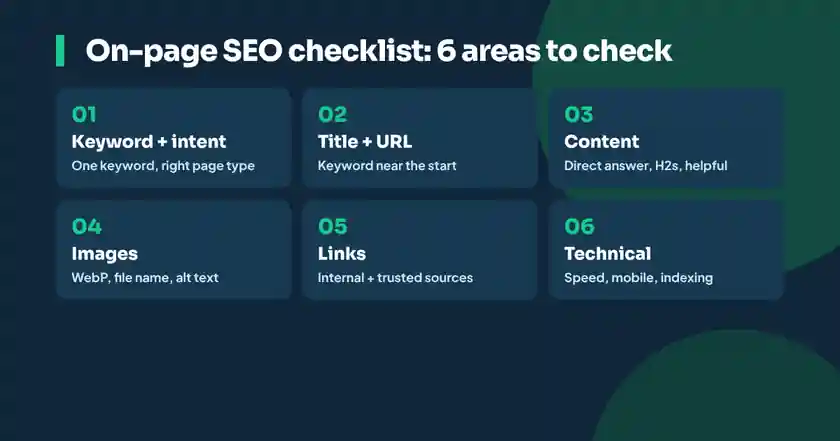
On-page SEO checklist: before you write
- Pick one main keyword. Choose one main keyword for the page and a few related phrases. If you have not done this yet, follow our guide on how to do keyword research.
- Match the search intent. Google the keyword and look at page 1. Are the results guides, lists, course pages or product pages? Create the same type of page. Learn more in what is search intent in SEO.
- Check what the top pages cover. Note the questions, sections and examples the top results include. Your page should cover the topic at least as well, and add something they miss: a local example, a table, real prices or your own experience.
Title, URL and meta description
- Write a clear title tag with the keyword near the start. Keep it around 50 to 60 characters so it does not get cut off on mobile. Make it specific and add a reason to click: a number, the year or a benefit. Example: “On-Page SEO Checklist for Beginners: 20 Easy Steps (2026)”. See Google’s title link guide for what Google looks for.
- Use a short, readable URL. Use the keyword, separate words with hyphens and remove extra words. Good: /on-page-seo-checklist/. Bad: /2026/11/09/post-123-on-page-seo-checklist-for-beginners-full-guide/. Google recommends simple, readable URLs.
- Write a meta description that sells the click. Around 140 to 160 characters, with the keyword and a clear promise. Google may rewrite it, but a good one often gets shown. More in Google’s meta description guide.
Content and headings
- Use one H1 with the keyword. In WordPress, the post title is usually the H1, so do not add another H1 in the content.
- Put the keyword in the first 100 words and answer the main question directly near the top. Readers and AI search tools both prefer pages that get to the point.
- Structure the page with H2 and H3 headings. Use headings that describe each section, and put the keyword or a close variation in at least one H2. Question-style headings (“How long does SEO take?”) work very well.
- Write helpful, original content. Cover the topic fully, use simple language, short paragraphs, lists and tables. Google rewards helpful, reliable, people-first content, not word count alone.
- Use the keyword naturally, not too often. Use related words and synonyms instead of repeating the exact phrase. Keyword stuffing makes the page worse for readers and for rankings.
- Show experience and trust (E-E-A-T). Add an author name and bio, real examples, your own screenshots or photos, and the date the content was updated.
Images and media
- Compress images and use WebP. Large images are the most common reason pages load slowly. Resize them to the size they show on screen and compress them before uploading.
- Give every image a descriptive file name and alt text. Example: file name on-page-seo-checklist.webp, alt text “On-page SEO checklist for beginners with 20 steps”. Alt text helps visually impaired users and helps Google understand the image. See Google’s image SEO guide.
Internal and external links
- Add internal links. Link to 3 to 5 related pages on your own website using descriptive anchor text, such as “keyword research guide”, not “click here”. Also link to the new page from an older related page, so Google finds it faster.
- Link to trusted sources. When you mention facts, data or official rules, link to the original source, such as Google’s own documentation. It helps readers and shows your content is reliable.
Technical checks on the page
- Check mobile and speed. Most searches in Pakistan happen on phones. Test the page in PageSpeed Insights and aim to pass the Core Web Vitals: Largest Contentful Paint under 2.5 seconds, Interaction to Next Paint under 200 milliseconds and Cumulative Layout Shift under 0.1.
- Add structured data where it fits. Article, FAQ, Course, Product or LocalBusiness markup helps Google understand the page. Plugins like Rank Math add much of this structured data for you.
- Make sure the page can be indexed. It should not be set to “noindex”, should be in your XML sitemap and should have a canonical URL pointing to itself. After publishing, request indexing with the URL Inspection tool in Google Search Console.
After you publish
- Measure and update. After 4 to 8 weeks, open Search Console, check which searches show the page and its average position, and improve the page: add missing questions, update facts and strengthen the title. Pages that are refreshed regularly tend to keep their rankings.
On-page SEO example: before and after
To see the difference, here is a typical page from a small online Quran academy, before and after a run through the checklist:
| Element | Before | After |
|---|---|---|
| Main keyword | None chosen | online Quran classes for kids |
| Title tag | Home | Classes | Online Quran Classes for Kids with Female Teachers (Free Trial) |
| URL | /page-2/ | /online-quran-classes-for-kids/ |
| First paragraph | “Welcome to our website” | Answers who the classes are for, timings and how the trial works |
| Headings | None | Class timings, Teachers, Fee, How to join, FAQs |
| Images | IMG_4432.jpg, no alt text | online-quran-class-kids.webp with descriptive alt text |
| Links | No internal links | Links to the Tajweed course, teacher profiles and contact page |
Does a green Rank Math or Yoast score mean you will rank?
Not on its own. Rank Math and Yoast are useful reminders, and they check many items in this on-page SEO checklist for you. But a green score only tells you the basics are in place. Google ranks the page that answers the search best, so a page scoring 70 with real examples can easily beat a page scoring 100 that says nothing new. Treat the score as a to-do list, not the finish line.
Common on-page SEO mistakes
- The same title on many pages: every page needs its own unique title and description.
- Hiding the answer: long stories before the actual answer make people leave.
- Huge images: a 3 MB photo can slow the whole page on mobile data.
- No internal links: new pages that no other page links to are hard for Google to find and seem less important.
- Thin or copied content: short pages that repeat what others say, or text copied from other websites.
- Publishing and forgetting: outdated prices, rules and years make readers and Google trust the page less.
Printable on-page SEO checklist
| # | Check | Done? |
|---|---|---|
| 1 | One main keyword chosen | |
| 2 | Page type matches search intent | |
| 3 | Covers what top pages cover, plus something extra | |
| 4 | Title tag with keyword near the start, 50 to 60 characters | |
| 5 | Short URL with keyword | |
| 6 | Meta description, 140 to 160 characters | |
| 7 | One H1 with keyword | |
| 8 | Keyword and direct answer in the first 100 words | |
| 9 | Clear H2 and H3 headings | |
| 10 | Helpful, original, easy-to-read content | |
| 11 | Keyword used naturally, no stuffing | |
| 12 | Author, examples and updated date shown | |
| 13 | Images compressed (WebP) | |
| 14 | Descriptive file names and alt text | |
| 15 | 3 to 5 internal links | |
| 16 | Links to trusted sources | |
| 17 | Passes mobile and speed checks | |
| 18 | Structured data added | |
| 19 | Indexable, in sitemap, indexing requested | |
| 20 | Reviewed and updated after 4 to 8 weeks |
On-page SEO and AI search
The same on-page habits also help your pages appear in AI answers from Google AI Overviews, AI Mode, ChatGPT and Perplexity: a direct answer at the top, clear headings, lists, tables, FAQs and trustworthy sources. We explain the difference in SEO vs AEO vs GEO: complete guide, and you can see how Google’s new search works in Google AI Mode in Urdu.
Learn on-page SEO with practice
Reading a checklist takes five minutes. Getting quick and confident with it takes practice on real pages. In Afhaam Academy’s SEO course in Urdu, you practise on-page SEO, keyword research and technical SEO on real websites in live online classes, with feedback on your work. Want SEO as a career? Follow our roadmap on how to become an SEO expert.
Want to practise on-page SEO with a mentor?
On-page SEO checklist: common questions
What is on-page SEO?
On-page SEO is optimising the content and code of a page itself, such as the keyword, title tag, URL, meta description, headings, content, images, links and structured data, so it ranks higher and gets more clicks.
What is the difference between on-page and off-page SEO?
On-page SEO is what you change on your own page. Off-page SEO is what happens outside your website, such as backlinks, brand mentions and reviews, which builds trust.
What are the most important on-page SEO factors?
Matching search intent, a clear title tag with the keyword, helpful original content, a direct answer near the top, good headings, internal links, fast mobile loading and compressed images with alt text.
How long should a blog post be for SEO?
There is no fixed length. Write as much as the topic needs to fully answer the search. Check how detailed the top-ranking pages are and aim to be more helpful, not just longer.
How many times should I use the keyword?
Use the main keyword in the title, URL, first paragraph and at least one heading, then use it naturally with related words. There is no perfect number, and repeating it too often hurts.
Can I do on-page SEO without coding?
Yes. In WordPress, an SEO plugin like Rank Math or Yoast lets you set titles, descriptions, alt text and structured data without code.